

ECAD MCAD Co Design: Simple Guide for Better Hardware Design
- Posted On:
- October 29, 2026
- Category:
- Ecad

Have you ever finished a PCB design only to find it doesn’t fit inside the enclosure?
A connector gets blocked, a component is too tall, or the mounting holes don’t align. Fixing these issues often means costly redesigns and project delays.
The problem usually isn’t the PCB or the enclosure—it’s that the electrical and mechanical teams designed them separately.
ECAD MCAD co design solves this by allowing both teams to work together throughout the design process, catching fit and clearance issues early before manufacturing.
What is ECAD MCAD Co Design?
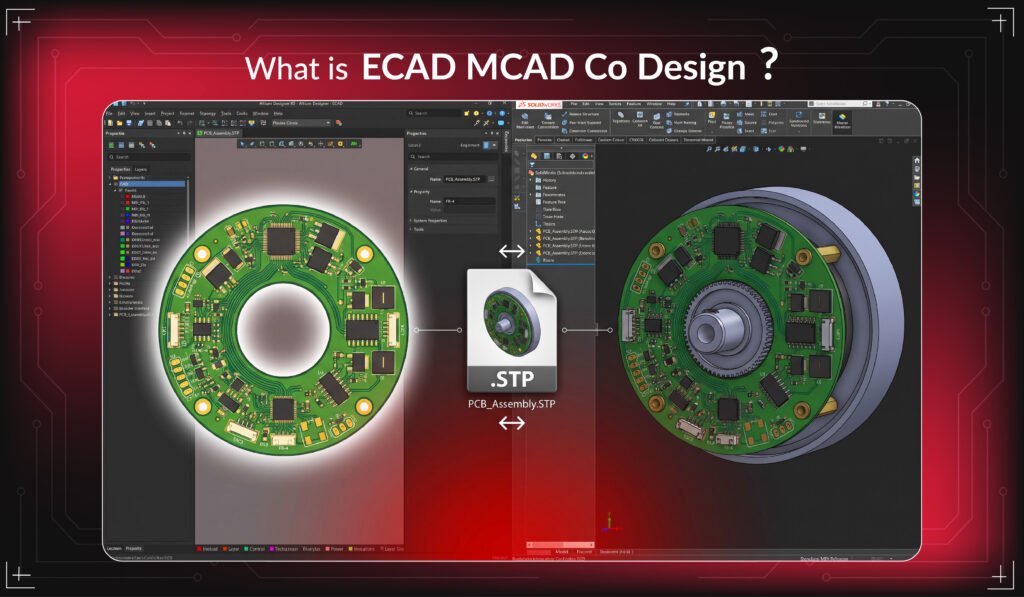
This is a collaborative process that integrates:
- ECAD (Electronic Computer-Aided Design) → PCB, circuits, components
- MCAD (Mechanical Computer-Aided Design) → enclosure, casing, product structure
Simple meaning:
- Electronics define the functionality
- Mechanical design defines the physical structure
- Integration ensures both works together without conflict
Without this coordination, even the best PCB design can fail in real-world assembly.
Why This Integration Matters
Modern electronic products are becoming:
- Smaller
- More compact
- Higher in component density
- More sensitive to heat and spacing
Because of this, even a 1–2 mm mismatch can create serious design failure.
How the Workflow Works (Step-by-Step)
Step 1: PCB Design in ECAD Tools
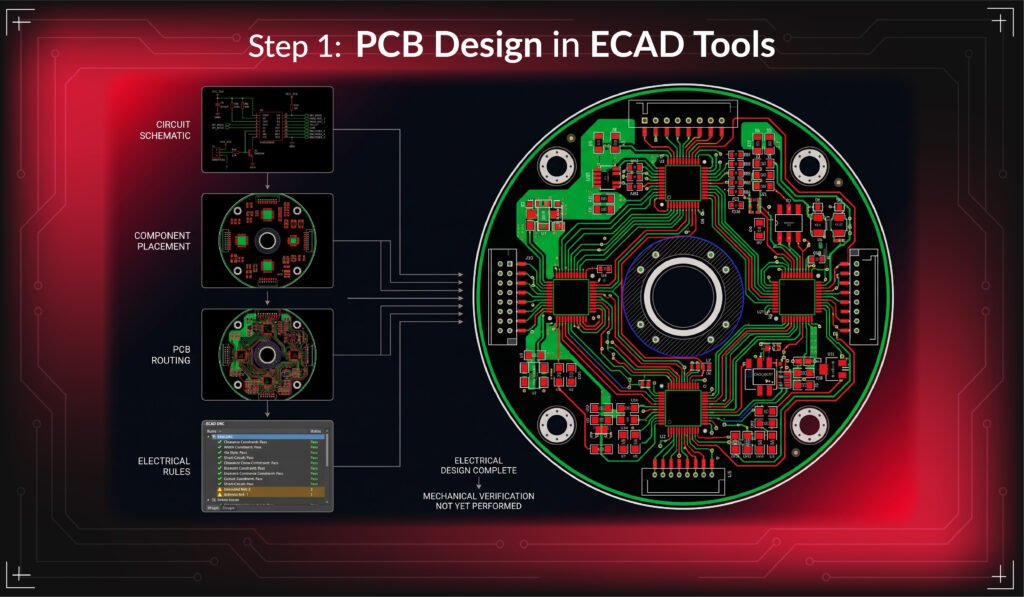
The process starts with PCB design using ECAD software such as:
- Altium Designer
In this stage, engineers design:
- Circuit schematics
- PCB routing
- Component placement
- Electrical rules and constraints
At this point, the design is electrically correct but not yet mechanically verified.
Step 2: Creating the 3D PCB Model
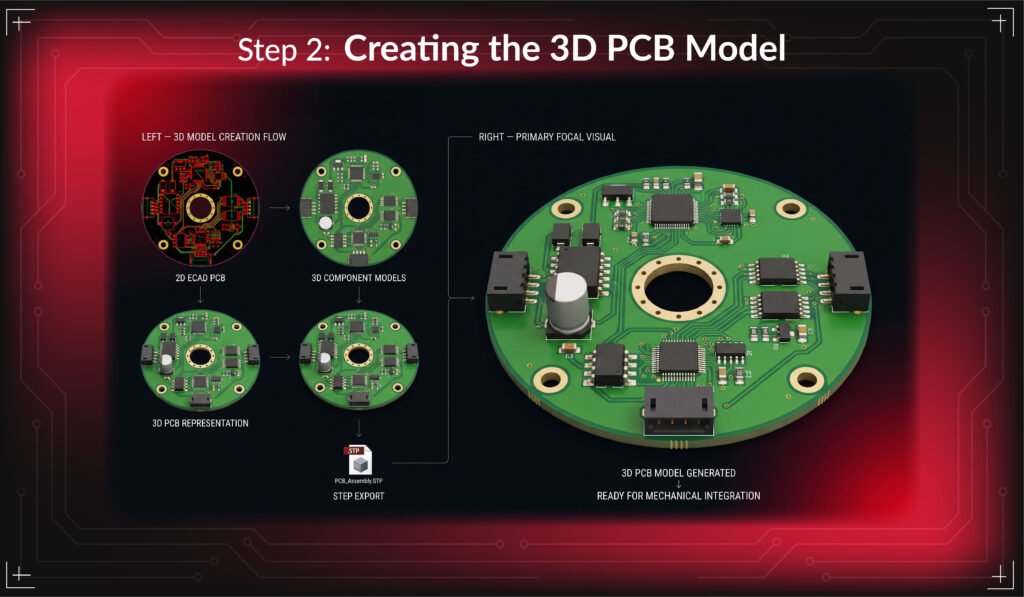
Once the PCB layout is ready, a 3D model is generated (usually STEP format).
This model helps mechanical engineers visualize the board in real space.
Step 3: Mechanical Design in MCAD Software
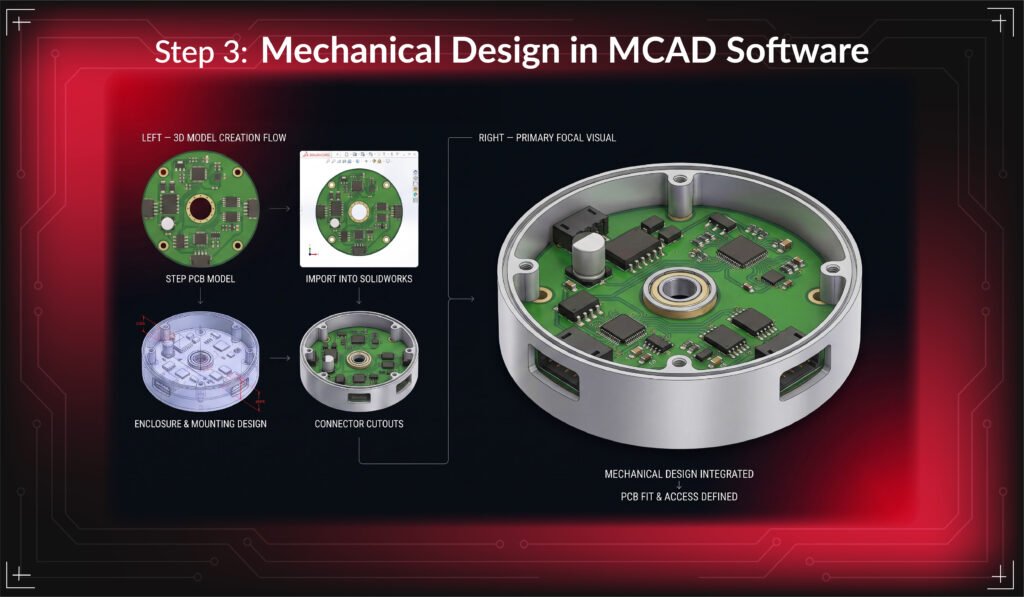
The PCB model is imported into mechanical design tools such as:
- SolidWorks
Now the mechanical engineer designs:
- Enclosure housing
- Mounting brackets
- Cutouts for connectors
- Airflow and cooling paths
- Structural support
This allows both PCB and enclosure to exist in the same digital environment.
Step 4: Checking Design Conflicts (Clash Detection)
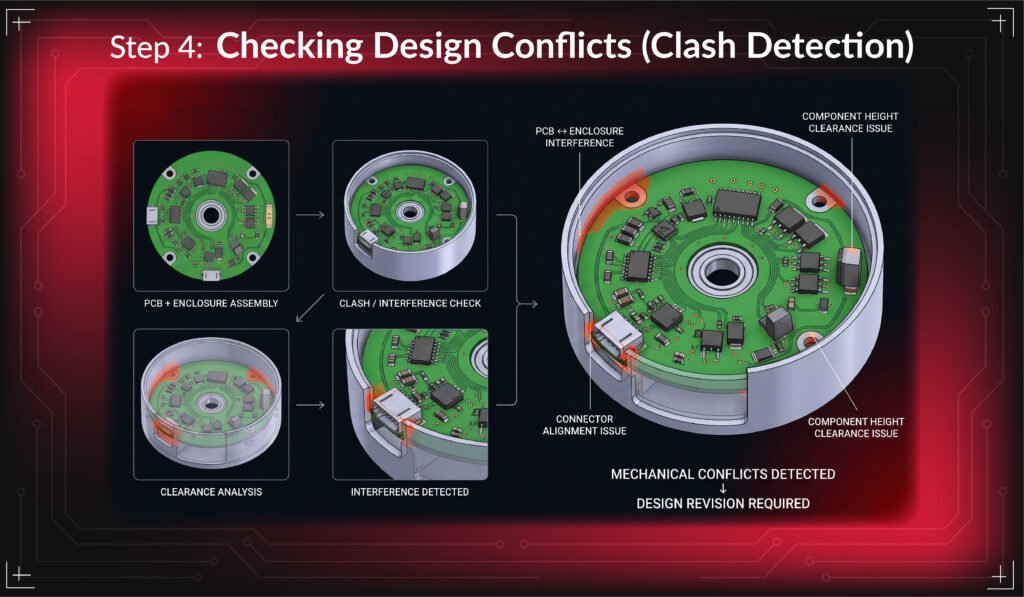
This is a critical stage in co-design.
Engineers check for:
- Physical interference between PCB and enclosure
- Connector alignment accuracy
- Component height clearance
- Airflow and thermal spacing
- Screw and mounting hole alignment
If any mismatch is found, it is immediately flagged for correction.
Step 5: Feedback Loop Between ECAD and MCAD
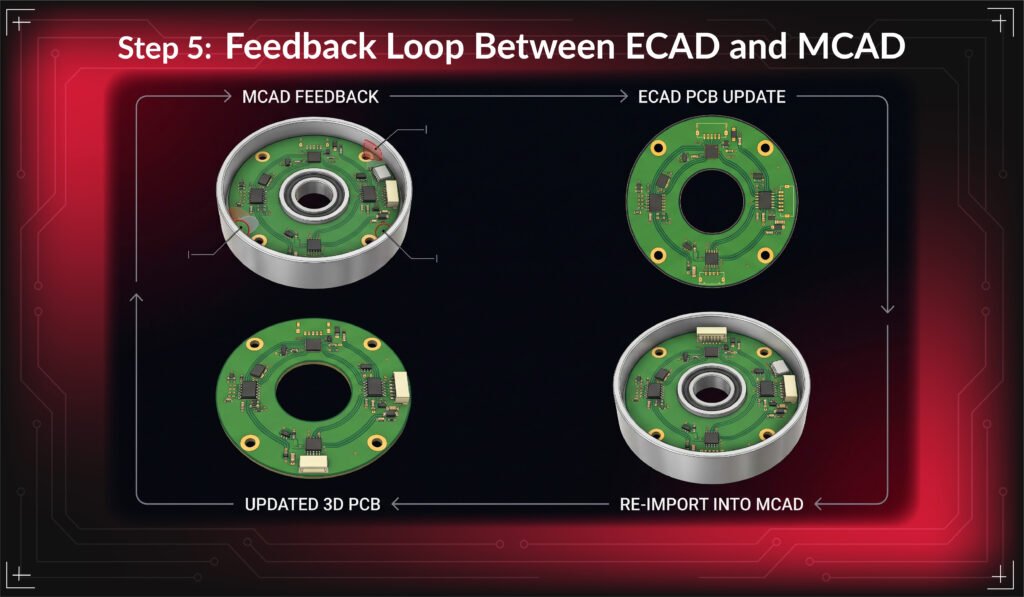
If issues appear:
- MCAD team sends feedback
- ECAD team updates PCB layout
- Updated design is re-imported
- Validation is repeated
This loop continues until both designs fully match.
Best Practices for Co Design
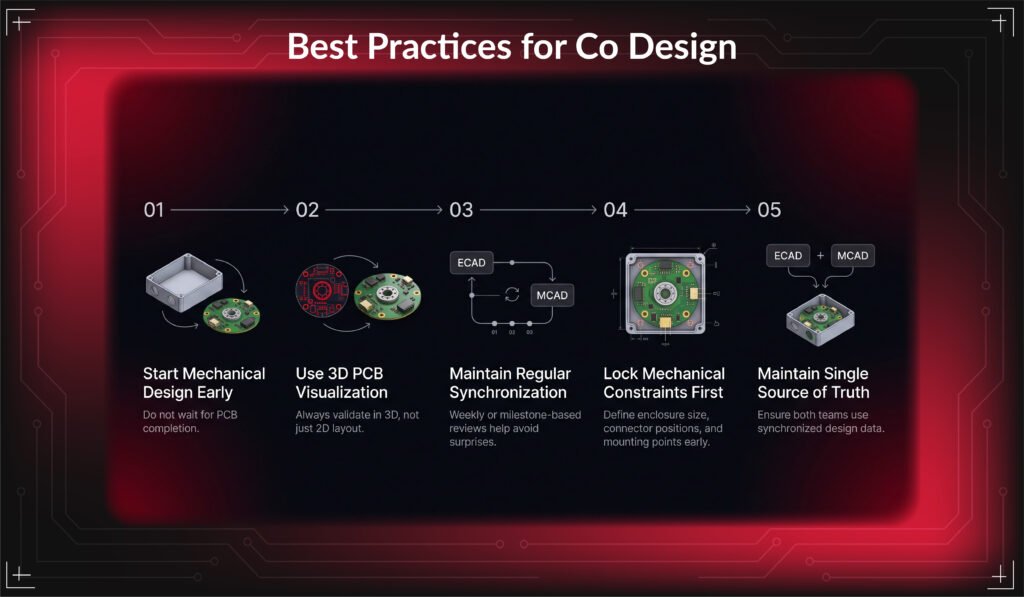
- Start Mechanical Design Early
Do not wait for PCB completion.
- Use 3D PCB Visualization
Always validate in 3D, not just 2D layout.
- Maintain Regular Synchronization
Weekly or milestone-based reviews help avoid surprises.
- Lock Mechanical Constraints First
Define enclosure size, connector positions, and mounting points early.
- Maintain Single Source of Truth
Ensure both teams use synchronized design data.
Common real-world problems without co-design:
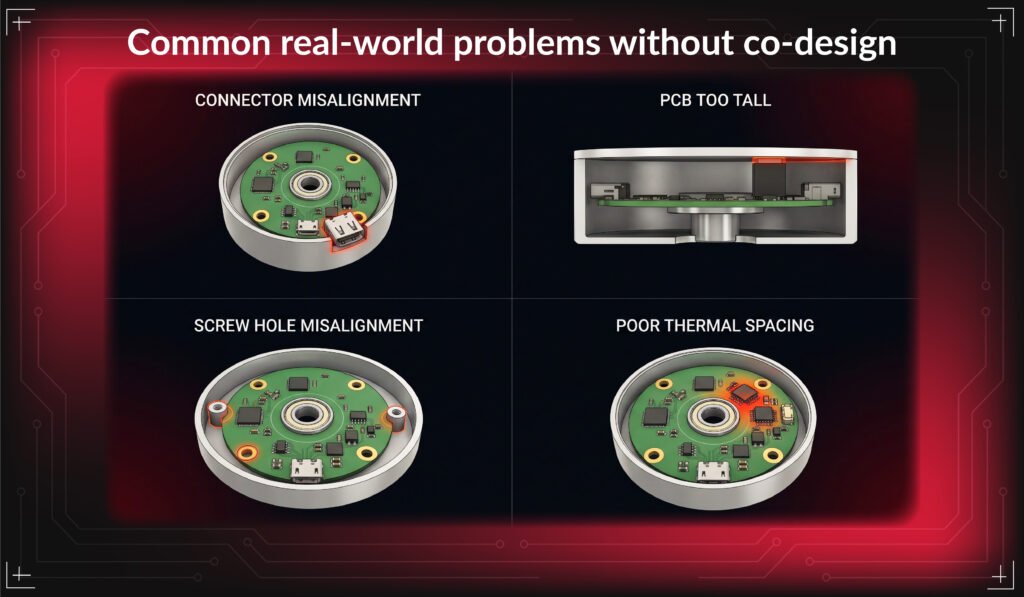
- USB, HDMI, or connectors not aligning with enclosure holes
- PCB too tall for enclosure clearance
- Screw holes not matching
- Thermal issues due to poor spacing
- Components touching mechanical walls
- These problems usually appear late in prototyping, which increases cost and delays.
Final Answers
ECAD MCAD co design is a critical part of modern hardware development.
It ensures that:
- PCB and enclosure are designed together
• Mechanical and electrical teams stay aligned
• Errors are detected early
• Product development becomes faster and cost-efficient
• Fewer revisions are needed before production
When both domains work in sync from the beginning, hardware design becomes more predictable, reliable, and production-ready.
In simple terms:
A strong hardware product is built not by separating electronics and mechanics, but by designing them as one connected system from the start.
Simplify your design process and improve product fit.
Reach out to our team today.
Book a call. Schedule a Free Consultation now. https://calendly.com/gighz/30min
FAQ
1. What is ECAD–MCAD co-design in hardware development?
A synchronized workflow where PCB design and mechanical enclosure design are developed together for proper alignment.
2. Why does ECAD–MCAD collaboration matter?
Prevents physical mismatch between electronic boards and mechanical housing during assembly.
3. Which issues get avoided using this workflow?
Connector misalignment, PCB fitting errors, clearance conflicts, and thermal spacing problems.
4. Which software tools support ECAD–MCAD integration?
Altium Designer for PCB design and SolidWorks for mechanical design are commonly used.
5. What advantages come from using ECAD–MCAD integration?
Lower redesign effort, reduced manufacturing cost, and faster product development cycles.
Stuck in a loop of challenges? Always pick smart solution that works
Have you faced costly rework because 2D drawings skipped in MCAD workflows?
Effective way to prevent MCAD documentation errors recalls?
Please answer both poll questions before submitting.
Thank you for your response! 😊
Latest Post
Get Customized Engineering CAD Design Service

Book a Free Consultation Call
Partner with Gighz and bring your most innovative design concepts to life. Our engineering cad services accelerate development so you can focus on your big vision.
